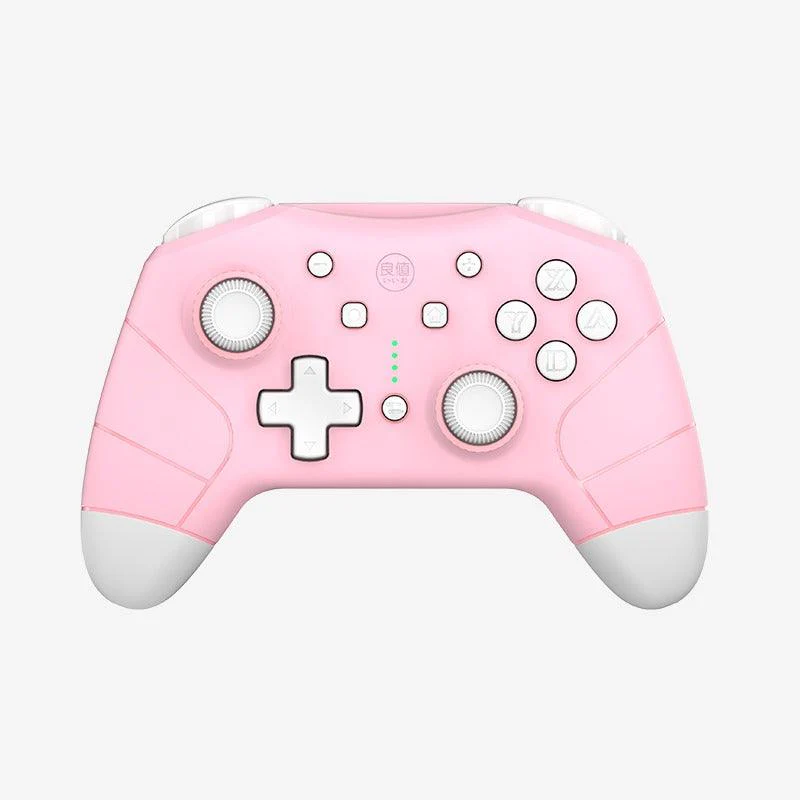
NSW IINE Wake Up Wireless Pro Controller For Switch (Queen Pink) (L704)
【Product Detail 】
▲Battery: 600 mAh
▲Using Time: 6 - 8 hours
▲Charging Time: 2 hours
▲Support : Nitendo Switch \ Nitendo Switch Lite
▲Size : 155mmx100mmx55mm
▲Come with a USB Cable and a Specification in English.
【 IF Drifting itself 】
1.Reset your controller, there is a small hole back of the controller( hidden a reset button in the hole) use a needle tie it.
Press the home button of pink amiibo controller to reconnect with switch.
2.Adjustment joysticks steps:System settings→Controllers and Sensors→Calibrate Control Sticks.
3.Set according to the Switch instructions ,Press down the joystick which you want to calibrate,Press X button to enter into calibrate.
4.Restar switch and reconnect with Switch.
5.Contact us to check the video about how to do that.
【Informative Description】
★ First time to connect: press the back button for 3 seconds, Loosen your hands when you see led lights on.
★ Reconnect: just need to press home button for 3 seconds on the home page.
★ IINE controller with six axis to make the game fell in reality.
★ IINE Kitten controller support multiplayer game, it can support up to 8 controllers in multiplayer game.
★ It with Turbo function, it can set up auto fire and clean auto fire, Please follow the video instructions to set auto fire.
★ NFC controller is dual motor vibration, it has three levels to adjust, Please follow the video instructions to adjust vibration
★ With NFC(amiibo) function, The NFC area is at the Logo of the Controller
★ Wake Up function, can wake up switch.
★ Have Headphone Jack, can use headset when you via connect with the controller
Original: $22.69
-70%$22.69
$6.81Product Information
Product Information
Shipping & Returns
Shipping & Returns
Description
【Product Detail 】
▲Battery: 600 mAh
▲Using Time: 6 - 8 hours
▲Charging Time: 2 hours
▲Support : Nitendo Switch \ Nitendo Switch Lite
▲Size : 155mmx100mmx55mm
▲Come with a USB Cable and a Specification in English.
【 IF Drifting itself 】
1.Reset your controller, there is a small hole back of the controller( hidden a reset button in the hole) use a needle tie it.
Press the home button of pink amiibo controller to reconnect with switch.
2.Adjustment joysticks steps:System settings→Controllers and Sensors→Calibrate Control Sticks.
3.Set according to the Switch instructions ,Press down the joystick which you want to calibrate,Press X button to enter into calibrate.
4.Restar switch and reconnect with Switch.
5.Contact us to check the video about how to do that.
【Informative Description】
★ First time to connect: press the back button for 3 seconds, Loosen your hands when you see led lights on.
★ Reconnect: just need to press home button for 3 seconds on the home page.
★ IINE controller with six axis to make the game fell in reality.
★ IINE Kitten controller support multiplayer game, it can support up to 8 controllers in multiplayer game.
★ It with Turbo function, it can set up auto fire and clean auto fire, Please follow the video instructions to set auto fire.
★ NFC controller is dual motor vibration, it has three levels to adjust, Please follow the video instructions to adjust vibration
★ With NFC(amiibo) function, The NFC area is at the Logo of the Controller
★ Wake Up function, can wake up switch.
★ Have Headphone Jack, can use headset when you via connect with the controller